How to Use SMS Segmentation in Klaviyo
TL;DR:
- SMS segmentation is a cost decision. Every recipient carries a per-message charge, so segment size is directly responsible for the return of the send.
- Build every segment on consent conditions before anything behavioural: consent status must be explicit for SMS. Layer the behaviour on top.
- Eight core segments cover most accounts. Back in stock, checkout abandonment and subscription events return the most per message. Browse abandonment and full-list promotions rarely justify the cost.
- Track revenue per message sent, A send to 6,000 high-intent profiles routinely beats a send to 40,000 once cost is in the calculation.
- WhatsApp needs its own consent, its own templates and its own launch sequence. Transactional first, marketing later, high-intent moments only.
SMS segmentation is really a cost decision before it is a targeting decision. Every recipient you add carries a per-message charge, so the question for this channel is… is it worth paying for the extra reach?
This guide covers consent architecture, the segments worth building, cross-channel suppression, and how to control spend through segment size. It assumes you already run Klaviyo and understand how segments work.
Who are we and what makes our content worth reading?
We at Underground Ecom are one of only 40 Klaviyo Elite Agencies, and since 2019 we have run retention programmes for 300+ brands including Hydro Flask, Osprey, AG1 and One Glove.
Why does SMS segmentation work differently to email?
- Cost per message makes list and segment size a real cost: Email is effectively free at the margin, so a broad send is defensible even when half the audience ignores it. SMS is priced per message and per country.
- Consent is separate, explicit and channel-specific: Your SMS list is its own asset, not a subset of your email list. UK and EU brands operate under GDPR and PECR, which require opt-in per channel and an opt-out on every message. A profile can be fully consented for email and hold no SMS permission at all.
How to create an SMS segment in Klaviyo, step by step
Worked example: consented SMS subscribers who clicked in the last 90 days.
Your default campaign audience, and the segment every other one gets built from.
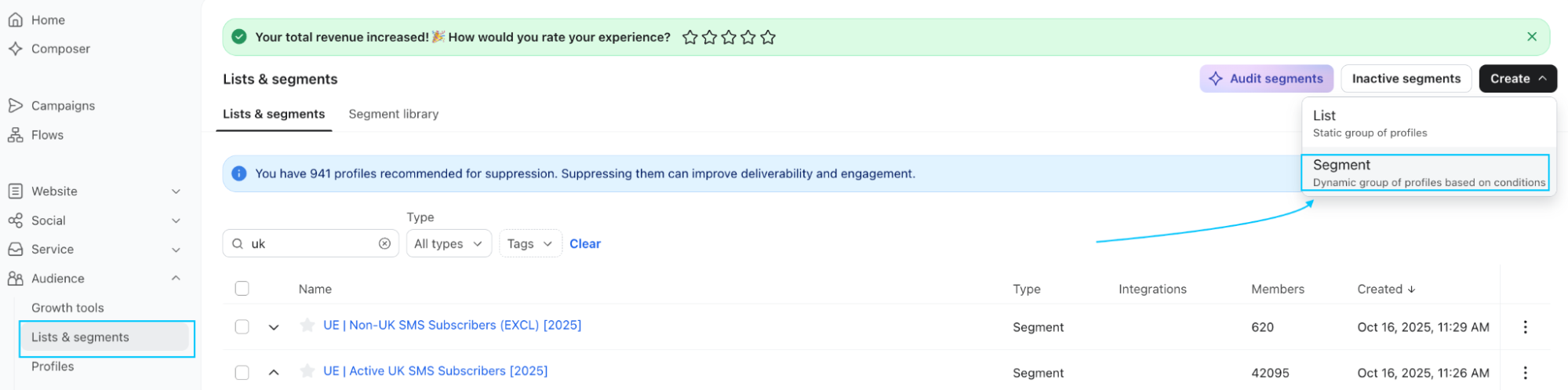
- Open the segment builder
Audience > Lists & segments > Create new > Create segment.
- Name it before you buildit
Apply your naming convention now, not later. UE | SMS Engaged 90. Renaming a segment already referenced by a flow or campaign is where accounts get confused.

- Set the consent condition first.
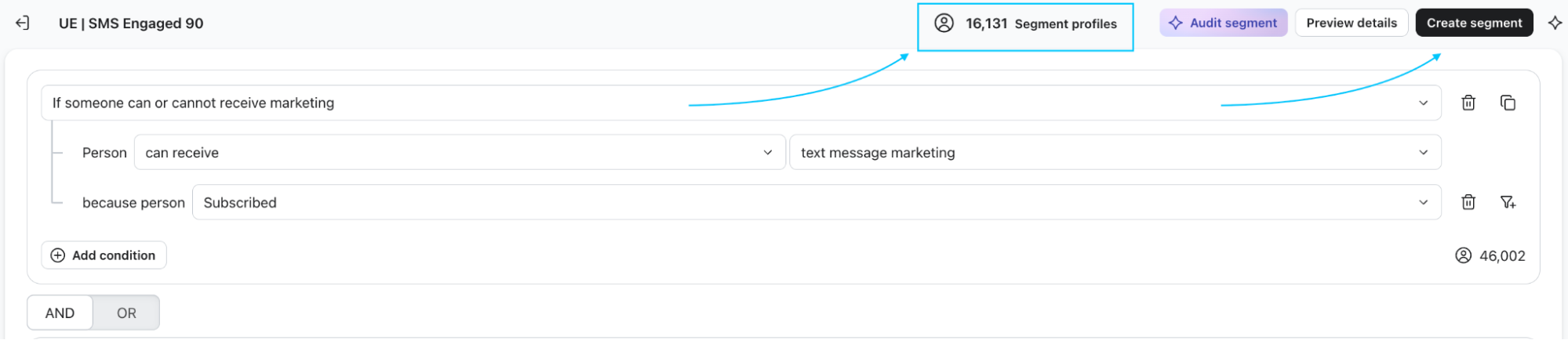
Definition tab > Properties about someone > Text Message Marketing > equals > Subscribed.
This is the condition that makes it an SMS segment rather than an email segment with a phone number attached.

- Add the behavioural condition with AND.
Click AND, then What someone has done (or not done) > Clicked SMS > at least once > in the last 90 days.
Use AND, not OR. OR here produces a segment of anyone consented or anyone who clicked, which is not what you asked for and will be far larger than you expect.

- Add the country filter.

AND > Properties about someone > Country (or your phone region property) > equals > United Kingdom.
Skip this only if you send to a single market. Once international numbers are in the list, cost per send stops being predictable.
- Add the deliverability exclusion.
AND > What someone has done (or not done) > Failed to deliver SMS > zero times > over all time.

- Check the size estimate before you save.
Klaviyo previews the member count as you build. If the number looks larger than expected, one of your conditions is on OR. If it looks near zero, your consent field is probably the wrong one, or the property you filtered on is not populated.
- Save and let it populate.
Segment membership calculates on save and updates on data change from then on. A large account takes a few minutes to backfill.
- Send a test before you send a campaign.
Add your own consented number to the segment conditions temporarily, or check that a known profile appears in the member list. A segment that returns members is not the same as a segment that returns the right members.
What are the conditions that matter when building an SMS segment?
Every SMS segment starts with the same conditions before you add anything behavioural.
1. Consent status
Sitting on your SMS list does not mean a profile is consented. Build on the consent field directly.
In the segment builder, use Properties about someone > SMS Marketing Consent > equals > Subscribed. Do not use is in list > SMS Subscribers as your consent check. List membership and consent state can diverge, and the list version will eventually include someone who has opted out.
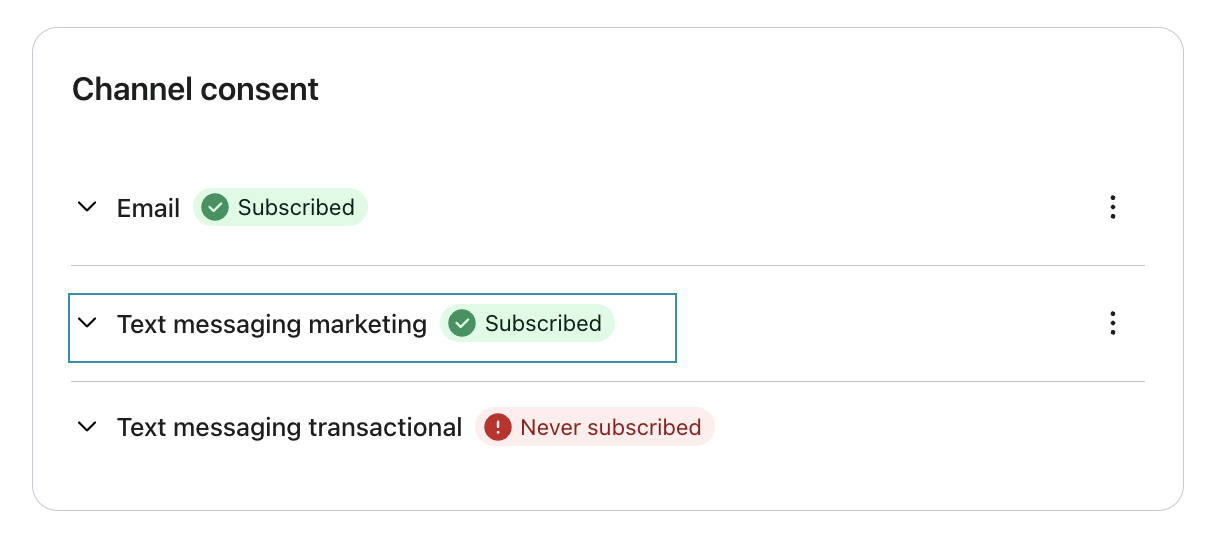
This is how explicit consent looks in a Klaviyo profile.
Marketing and transactional consent are separate fields. A profile that opted out of marketing can still receive shipping notifications, so building on the wrong one means either sending without permission or suppressing people you are allowed to message. UK and EU brands operate under GDPR and PECR, which require opt-in per channel and an opt-out on every message.
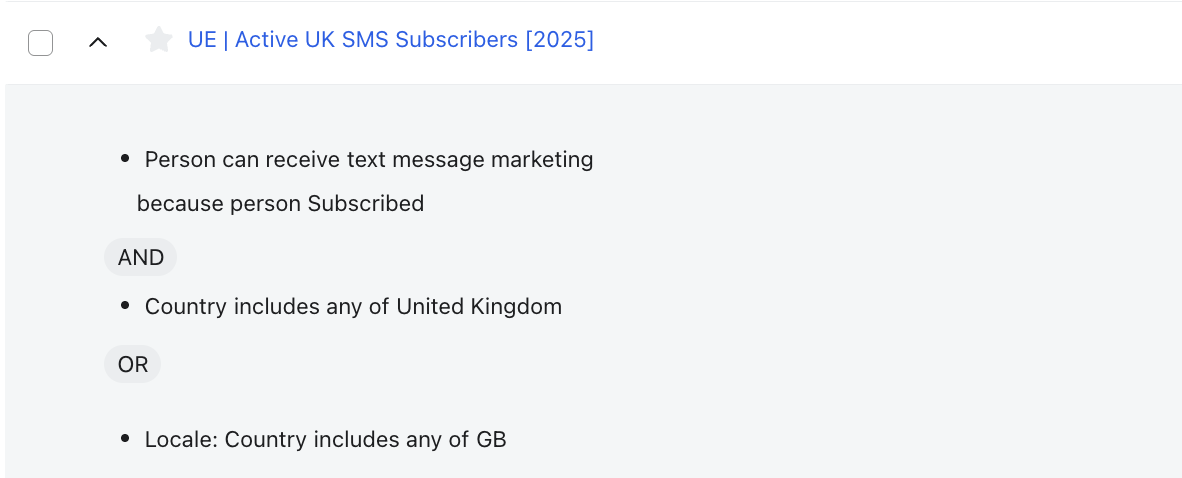
2. Country or region
Per-message pricing varies by market. Filter on phone number region or a country property before you approve any send size. A segment that is profitable across a UK list may not be once international numbers are in it.
3. Deliverability exclusions
Exclude profiles with repeated failed sends. Klaviyo flags undeliverable numbers, and retrying them spends budget on messages that will not land.

Layer the behavioural condition on top: purchased, browsed, started checkout, joined a waitlist. That part varies by segment. The three above never change.
What are the core SMS segments that we use at UndergroundEcom?
Eight segments, with the condition and the reason the message cost is justified.
| Segment | Condition | Why the message cost is justified |
| Consented and recently active | Clicked an SMS or placed an order in the last [X] days | Your default campaign audience, and the only segment that should receive routine promotional sends |
| Recent purchasers | Rolling window matched to fulfilment time | Transactional and post-purchase SMS only, excluded from every promotional send |
| High-intent browsers | Viewed a product two or more times without purchasing, or started checkout in the last [X] hours | Intent is live and the window is short. The strongest case for spending a message |
| VIP and high LTV | Above the account’s lifetime value threshold | Justified by margin rather than response rate. Early access outperforms discounting here |
| Subscription customers | Upcoming charge, failed payment, cancellation risk | Anything time-sensitive that costs the customer money if missed |
| Back in stock and waitlist | Joined a waitlist or back in stock alert | Self-selected demand with an expiry date. Usually the highest conversion rate in the programme |
| Lapsed high value | Past the repeat window, above the LTV threshold | Small and expensive per recipient, and generally worth it |
| Never engaged SMS | Consented, received [X] or more messages, never clicked or purchased | Built to be suppressed, not messaged |
Cost control through segmentation
A send to 40,000 consented profiles, and a send to 6,000 high-intent profiles can produce similar revenue. The first costs roughly six times as much to deliver, and it also spends opt-out rate, which is the scarcer resource.
Track revenue per message sent, not revenue per campaign. It is the only figure that reflects the send cost, and it usually shows the smaller audience winning.
Two rules worth setting as standards:
Segment by country before you approve a send size. Rates vary by market and the same segment has a different cost in each.
Cap segment size for routine campaigns. Reserve full-list sends for genuinely broad moments: a major launch, a sale opening. Everything else runs against a defined engagement window.
💡 What we did for Osprey: SMS subscribers grew by over 99% across a 12-month period while the retention programme moved to RFM tiers and loyalty data. The point: growing the consented base and increasing send volume are separate decisions. The first is worth pushing hard. The second has to be considered.
Bonus: Unmissable segments with the highest return: our ranking
These are performing. Every single time.
- Back in stock and waitlist. Self-selected demand with an expiry date. Nothing else comes close.
2. Checkout abandonment. Live intent, short window.
3. Subscription events. Failed payment and upcoming charge. The customer loses money by ignoring it.
4. VIP early access. Small audience, high margin, no discount required.
5. Lapsed high value. Expensive per recipient, justified by order value.
6. Routine promotional to engaged. Works, earns its cost, rarely spectacular.
BFCM and SMS, Per4m results
Ahead of Black Friday, our partner Per4m used this strategy: early access for people who opted in specifically for it. 758 contacts collected before launch.
It was the highest-performing segment of the launch by a distance.
52.34% click rate. 14.94% placed order rate.
The number that matters is the last one on the card: £14.72 revenue per recipient.
That is the metric this whole article argues for. A full-list BFCM send to 40,000 would have cost roughly fifty times as much to deliver and would not have produced fifty times the revenue. A segment of under a thousand people, collected for one purpose and messaged once, outperformed everything sent to a wider audience that weekend.
The mechanics were unremarkable. Capture the opt-in on a dedicated early access form, hold the segment until launch, send once. The work was in resisting the instinct to widen it.
List health on SMS
Opt-out rate is the primary signal. It moves faster than any email metric and it is permanent. An email unsubscribe costs you a subscriber; an SMS opt-out costs you one you paid to acquire and paid again to lose.
Watch it per segment rather than per campaign. A rate rising in one segment tells you what to stop sending.
Invalid and unreachable numbers accumulate quietly. Profiles that repeatedly fail should be suppressed rather than retried.
Carrier filtering applies to content as well as volume. Link shorteners, all-caps openers and aggressive discount language raise filtering risk.
Sunset earlier than you would on email. Non-engagement on SMS is a stronger signal, because the message is harder to ignore than an inbox entry. Someone who has received [X] messages without a click or a purchase is costing money to keep.
WhatsApp, where it differs
Same profile, same segments, different rules.
- Consent is separate again: WhatsApp permission is not SMS permission. Collect and store it distinctly.
- Templates need Meta approval before a marketing message sends, which removes the ability to react quickly unless the template is already approved.
- Meta assigns a quality rating that throttles delivery if a cold sender pushes too hard. Volume has to be earned rather than switched on.
- Session windows govern when a free-form reply is possible, which suits conversational moments more than broadcast.
- Segmentation implication: WhatsApp goes to high-intent moments only. Drops, restocks, sale windows, and anything the customer has explicitly asked to be told about.
SMS vs. WhatsApp: how do they compare?
| SMS | ||
| Consent | Separate opt-in per channel | Separate again, not covered by SMS |
| Format | 160 characters, plain text | Rich media, replies, threads |
| Cost model | Per message, per country | Per conversation window |
| Speed to send | Immediate | Templates need Meta approval |
| Delivery risk | Carrier filtering | Quality rating throttles volume |
| Best for | Time-critical, transactional | Drops, restocks, high intent |
Why did we use WhatsApp for OneGlove?
One Glove’s email programme was already mature: years of flow and segmentation work, open rates ahead of category norms, no obvious room left.
The audience is young and mobile-first, a demographic where inbox attention is lower than average, so sending more email meant pressure on a programme already at its ceiling.
WhatsApp had a different ceiling. We launched it as a staged build: consent layered into the existing pop-up as a second step after email capture, transactional messages only for the first two months to earn a stable Meta quality rating, then marketing restricted to drops, restocks and sale windows.
WhatsApp campaigns average a 30% click rate against roughly 1% on email, with zero spam complaints across the programme. Email volume held throughout.
Frequently asked questions
Can I use my email segments for SMS?
The conditions transfer, the audience does not. An SMS send only reaches profiles holding SMS consent, so every segment needs a consent condition layered on. Sizes will be a fraction of the email equivalent.
How often should I send SMS?
Frequency matters less than fit. Send when the message is time-sensitive or the audience is high intent. Routine weekly SMS to a broad list is the fastest way to raise opt-out rate.
Do I need separate consent for WhatsApp?
Yes. SMS consent does not cover WhatsApp, and marketing consent does not cover transactional. Collect and store all three separately.
How large should an SMS segment be?
Small enough to justify the cost per recipient. Most accounts over-send by an order of magnitude before they measure revenue per message sent.
Does SMS hurt email performance?
Not if the exclusions are shared. It does if both channels send the same message in the same window.
Want a deeper audit?
We run free channel audits. Thirty minutes, operator to operator, no pitch deck. We look at consent architecture, segment structure, cross-channel suppression and cost per message, and tell you what we would change and in what order.
Jamie Watkins, Director at Underground Ecom