How to Use Klaviyo: A Complete Guide for Ecommerce Operators
TL;DR:
- Klaviyo is a customer data platform with messaging attached. The database and integrations are the strength.
- Setup decides most of it. Verify the conversion metric is mapped to Placed Order, connect your subscription and support stack before building flows, authenticate a dedicated sending subdomain, and set naming conventions before anything gets created.
- Lists are static membership and hold consent. Segments are live queries. One master email list, one SMS list, segments added on top for every targeting decision.
- Suppress flows by excluding on the higher-priority flow’s trigger metric, set as a flow filter and scoped to “since starting this flow”. Klaviyo has no “is in another flow” condition.
- Build engagement segments on clicks, not opens. Apple pre-fetching registers opens the recipient never made, which inflates your engaged segment with people who stopped reading.
- Deliverability is an engagement problem and a technical one. Sunset unresponsive profiles, warm new domains on engaged segments, and watch complaint rate per segment.
- Read reporting sceptically. Revenue per recipient over open rate, and a click-only attribution window over the default.
Klaviyo is the email marketing platform for a large share of DTC ecommerce, and one of the most powerful. Most brands we onboard use a fraction of what it can do.
This guide covers the main aspects of account setup, the data model, flow architecture, segmentation, deliverability and reporting.
Who we are
At UndergroundEcom we help brands build highly profitable relationships with every customer. We are one of only 40 Klaviyo Elite Agencies, rated 5 stars by hundreds of ecommerce brands. Since 2019 we have partnered with 300+ brands including Hydro Flask, Osprey, AG1 and Surreal, and audited 1000+ accounts. Everything in this guide comes from experience our team has accumulated first-hand.
What is Klaviyo?
Klaviyo is a cloud-based B2C CRM and marketing automation platform built primarily for e-commerce brands, which lets online stores collect and unify real-time customer data to send targeted, personalized marketing messages via email, SMS, WhatsApp, and mobile push notifications
The platform has come a long way since its inception. When we describe it to our partners, we call it a customer data platform with messaging attached. The database and the integrations are the real strength; the sending layer leverages them.
Why does that matter? Every profile carries its full behavioural history: every order, every browse session, every email open, every SMS reply, every custom event you push into it.
Before you build anything: account setup
When auditing accounts, we notice that a lot of the expensive problems in a Klaviyo account are created during the first setup and only discovered months later. Four things to get right before you build a single flow.
Connect your ecommerce platform
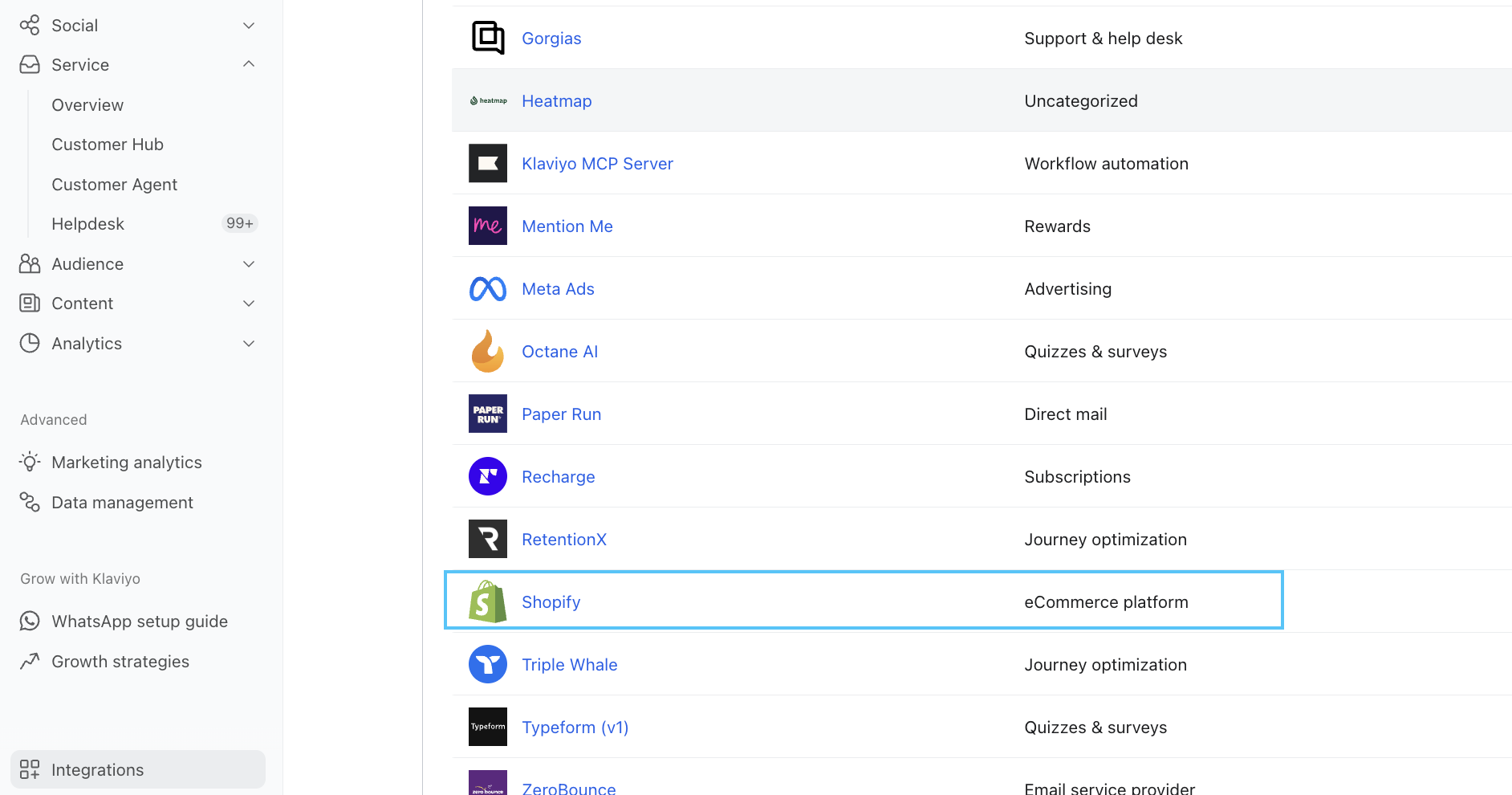
Shopify, WooCommerce and BigCommerce all have native integrations. Shopify is by far the deepest.
On connection, Klaviyo backfills historical order data. Check what actually came through before you trust it.
Common gaps: draft orders, POS orders, orders placed through a headless front end, and anything routed through a third-party checkout. Revenue reporting that looks light against Shopify from day one usually traces back here.
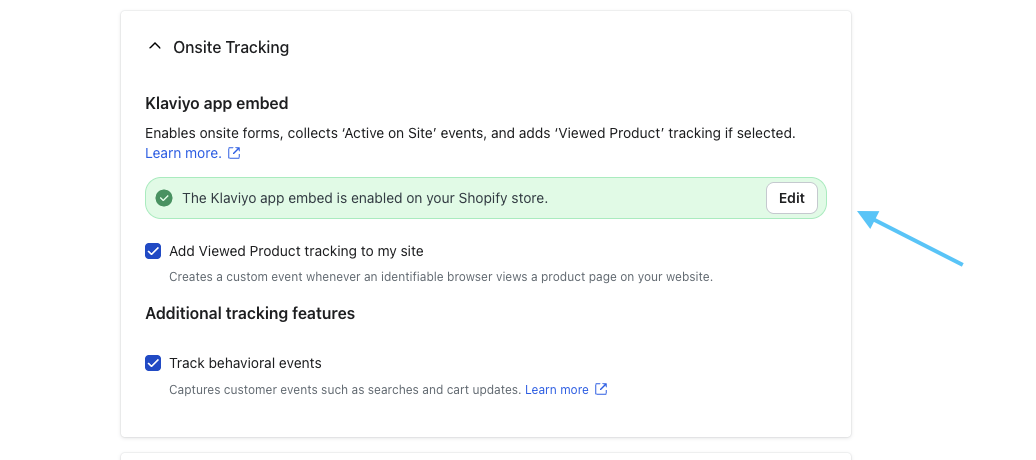
Enable onsite tracking at the same time. Without it you have no browse data, which removes browse abandonment and all behavioural segmentation on non-purchasers.
We took over email for Hydro Flask in early 2025 and the programme ran for months with no visible revenue. The cause was the Magento integration: the conversion metric was mapped to Active on Site rather than Placed Order, so nothing the emails generated was attributed back.
Connect your subscription and support stack
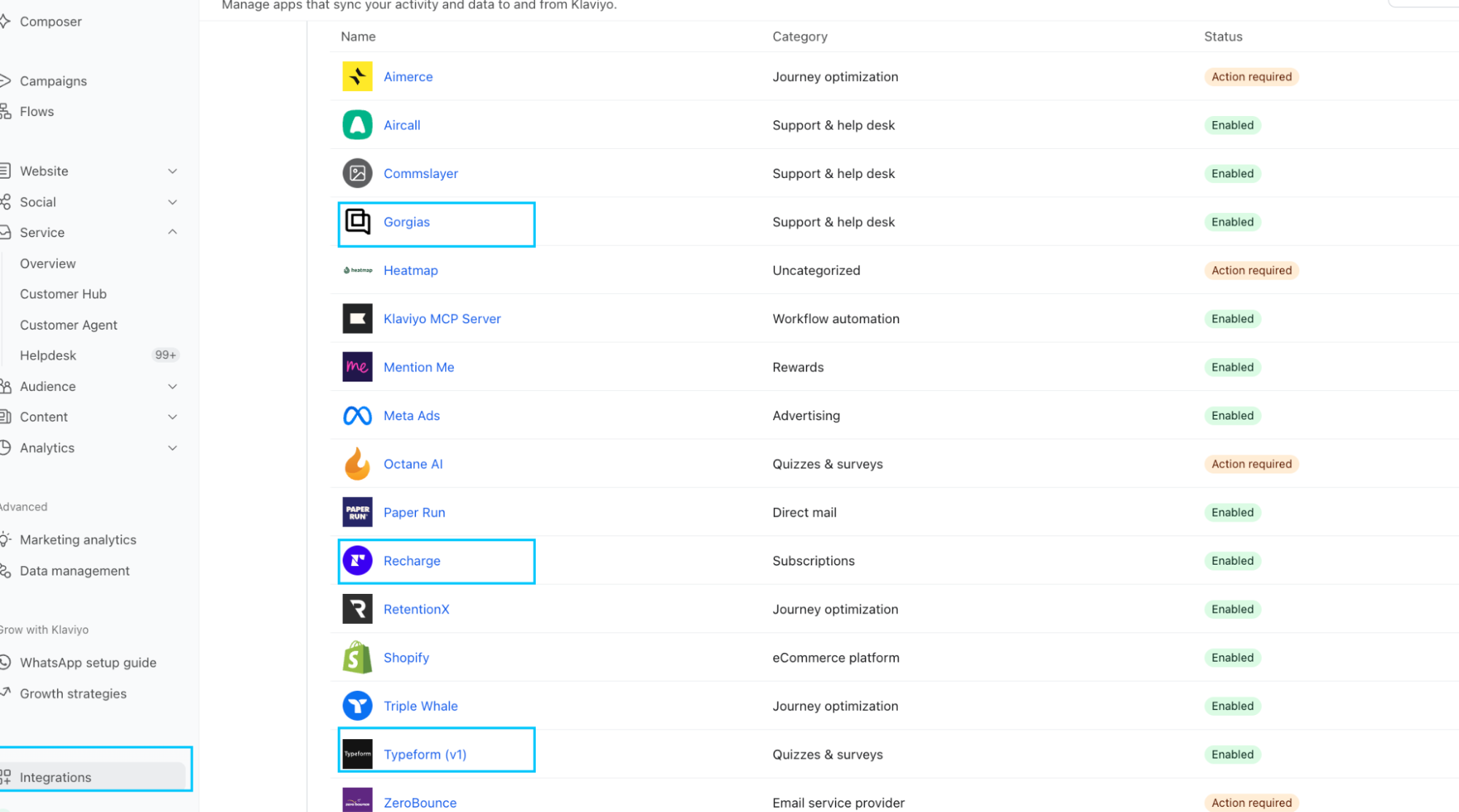
- Recharge if you run subscriptions. Without it you have no subscription status, no upcoming charge date and no cancellation event, which removes the entire retention side of a subscription programme.
- Gorgias or Zendesk for support ticket status. The primary use case is suppression: holding promotional campaigns back from anyone with an open complaint ticket.
- Reviews platform for post-purchase sequencing and sentiment-based segmentation.
Connect these before you build flows. Retrofitting a flow to use data you added later means rebuilding trigger logic and re-testing everything downstream.
Authenticate your sending domain
Set up a dedicated sending subdomain with the DNS records Klaviyo provides. Move off the shared domain once testing finishes.
On the shared domain your sending reputation pools with every other brand on it. At low volume that is survivable. At meaningful campaign volume you absorb the deliverability consequences of other people’s list hygiene with no ability to fix them.
Send from a subdomain. Keep the root domain reserved for transactional and corporate mail so marketing reputation damage stays contained.
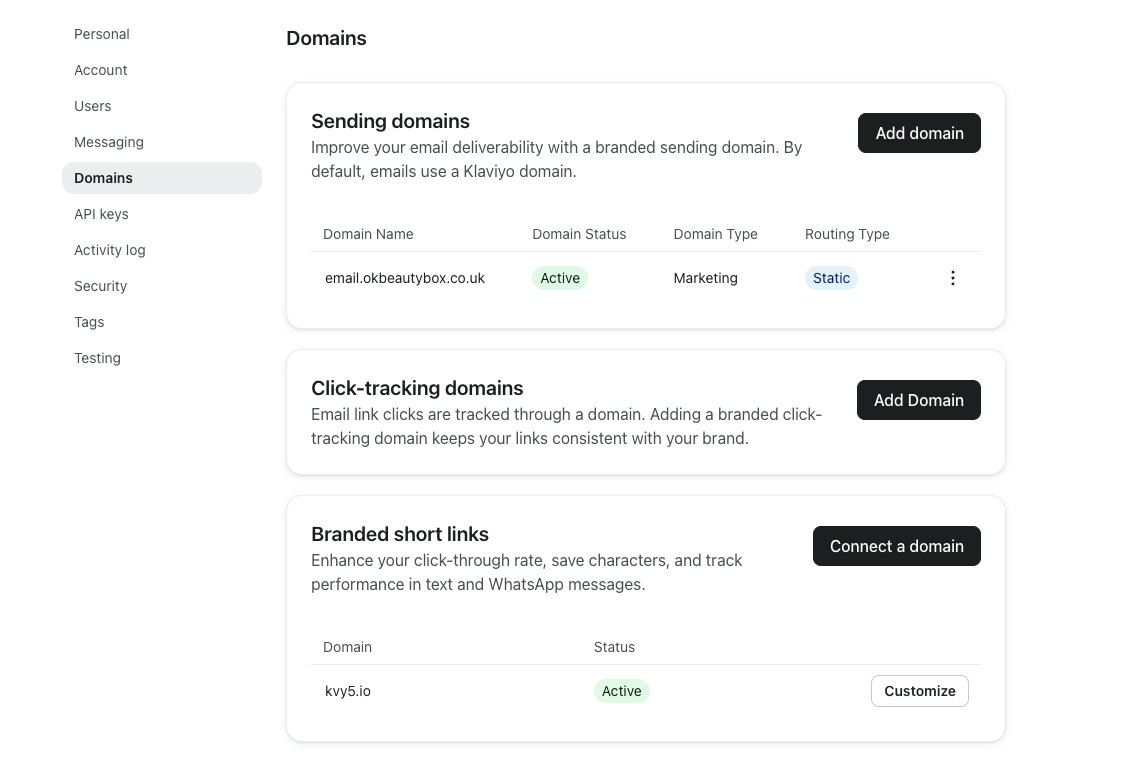
In our experience, this process has become simpler. Until recently, authenticating your domain was optional and many brands were not doing it. Klaviyo now requires it before you can send, and has made it a straightforward step-by-step process. Head to Settings > Domains and click Add Domain to start.
Set naming conventions before you build
The cheapest thing you will ever do and the most expensive thing to retrofit.
Decide the naming structure for flows, segments, tags and campaigns before anything gets created.
We have audited accounts carrying 200 segments with no convention. Nobody there could tell which segments were live, which were built for a campaign in 2023, and which were safe to delete.
The specific convention matters less than having one and enforcing it. Apply it retroactively at the point you set it.
We keep flows tidy with one convention: UE in front of every flow name, for instance “UE | Winback Flow (2026)”. Avoid vague words such as “Final” or “New”. Use “v1”, “v2”, “October 2026” or “Black Friday” instead, so the name carries real information.
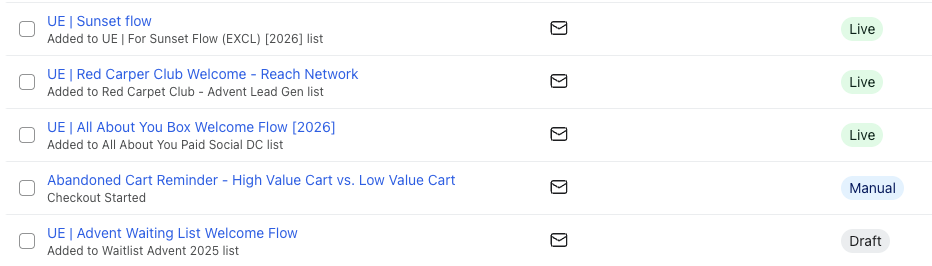
We use the same convention for segments, with “UE |” in front of every segment we create, for instance “UE | Engaged 90”.
The reason we are strict about this is what happens without it. Open an account with no convention and you find three flows with some version of the same name: Welcome Flow, Welcome Flow NEW, Welcome Flow FINAL. The same happens to segments,
The Klaviyo data model
Four object types run every account: profiles, metrics, events and properties.
Profiles
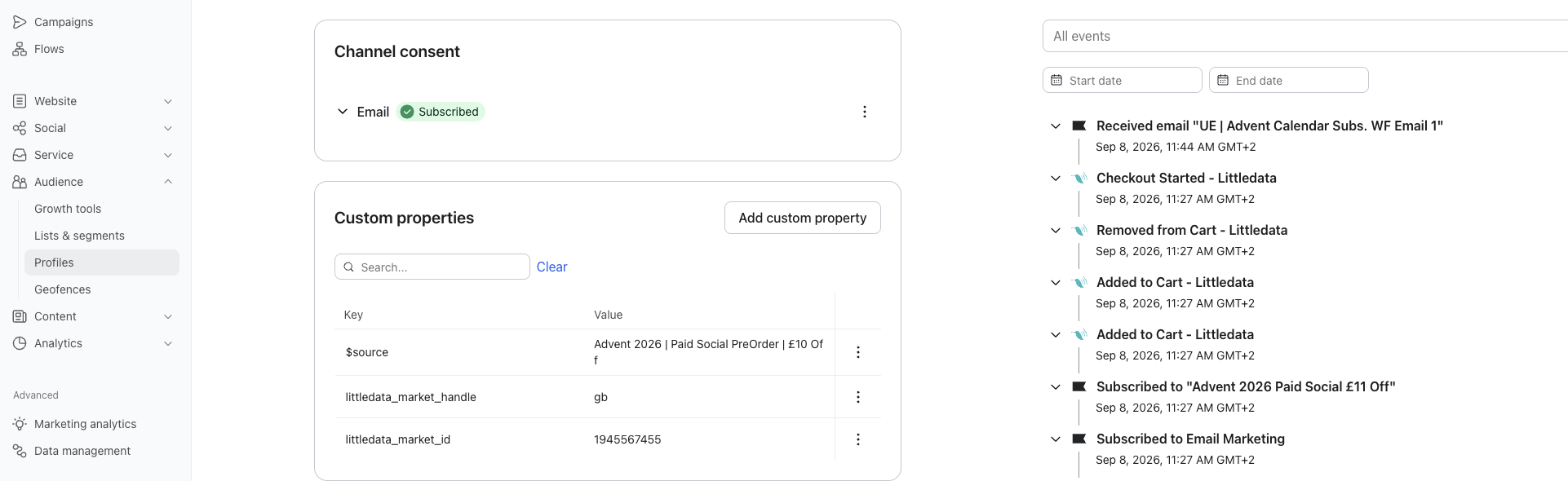
A profile is the record for one person. Klaviyo merges anonymous browsing activity into a known profile once that person identifies themselves through a signup form, an email click, or checkout.
Metrics and events
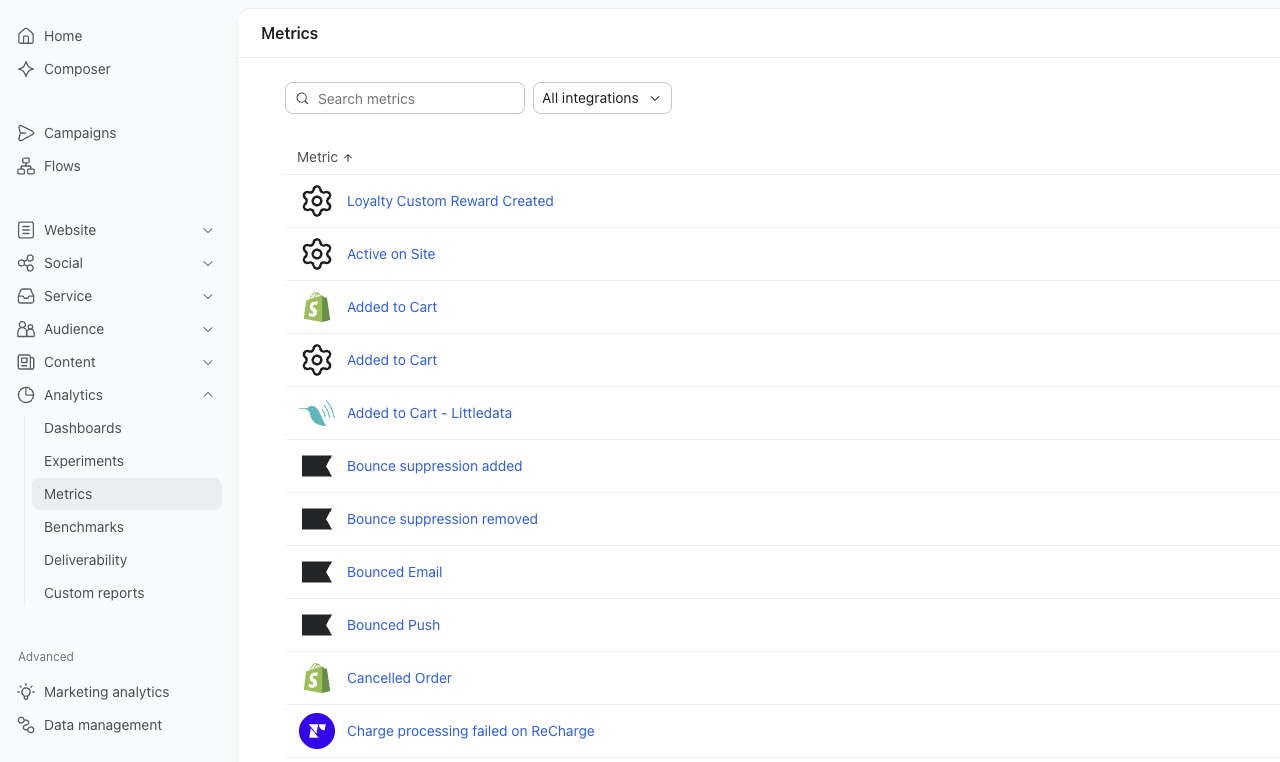
A metric is a category of behaviour: Placed Order, Viewed Product, Received Email. An event is a single instance of that metric, attached to one profile at one timestamp, carrying its own payload.
The payload holds the value. A Placed Order event carries line items, discount codes, order value, SKUs and collections.
Segment and flow logic reads into that payload, which is how you build “purchased from collection X in the last 60 days and has never purchased from collection Y.”
Profile properties
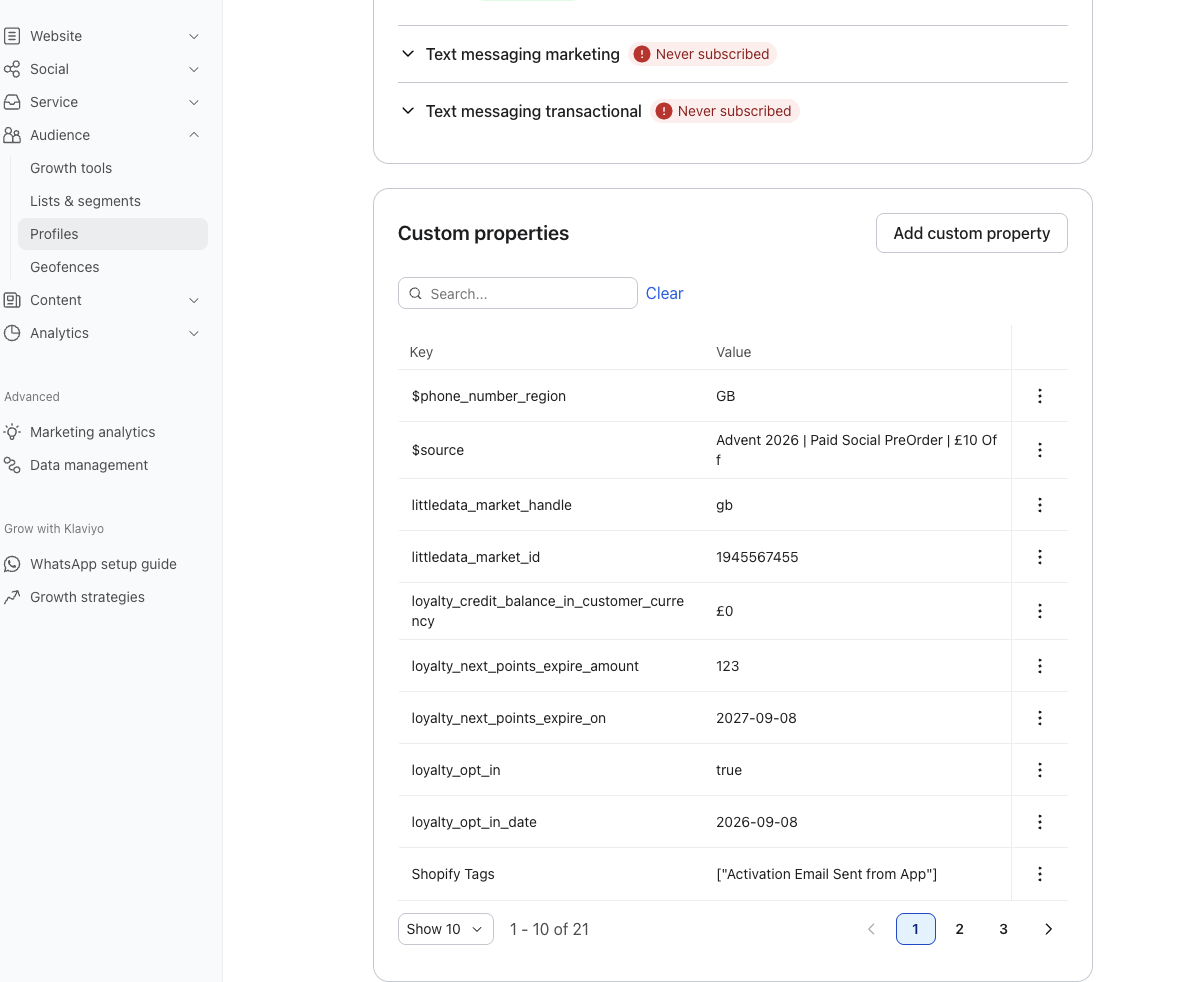
A property is a static field on the profile: birthday, preferred size, acquisition source, VIP status, subscription tier. Properties persist until something overwrites them.
Use a property for stable attributes you reference repeatedly. Use event history for behavioural, time-bound values.
A common failure is writing behavioural state into a property. A property called “engaged” that updates on a schedule is stale the moment it gets written. Query event history instead, which evaluates live.
Custom properties carry ongoing cost: something has to write them and keep writing them. Every custom property is a dependency on a Shopify metafield, an API push, or a manual upload that will eventually break quietly.
Profile count and billing
Klaviyo bills on active profiles. Syncing twelve years of one-time buyers who have never opened an email raises the bill without raising revenue.
Decide what belongs in Klaviyo before you sync. Suppressed profiles fall outside billing, which makes a genuine sunset policy a cost lever as well as a deliverability one.
Osprey sells durable goods with long repurchase cycles, which makes generic campaigns close to useless. Standard Klaviyo purchase data was not enough to separate a customer worth protecting from one worth discounting.
We integrated Yotpo Loyalty with Klaviyo and built RFM segmentation on top of it, scoring on recency, frequency and monetary value. That gave us tiers to target rather than a single list.
Champions and Loyal Customers see premium products at full price. At Risk, Needs Attention and Inactive see entry-level products with the incentive attached. Discounts only go where churn risk justifies them, which protects margin on the customers who were never going to need the discount.
Lists versus segments
A list is static membership. A profile joins when something adds it and stays until something removes it.
A segment is a live query. Membership recalculates as profile data changes.
Use lists for consent capture and for genuinely fixed groups: newsletter signups, a VIP programme with manual admission, an event guest list. Use segments for everything else.
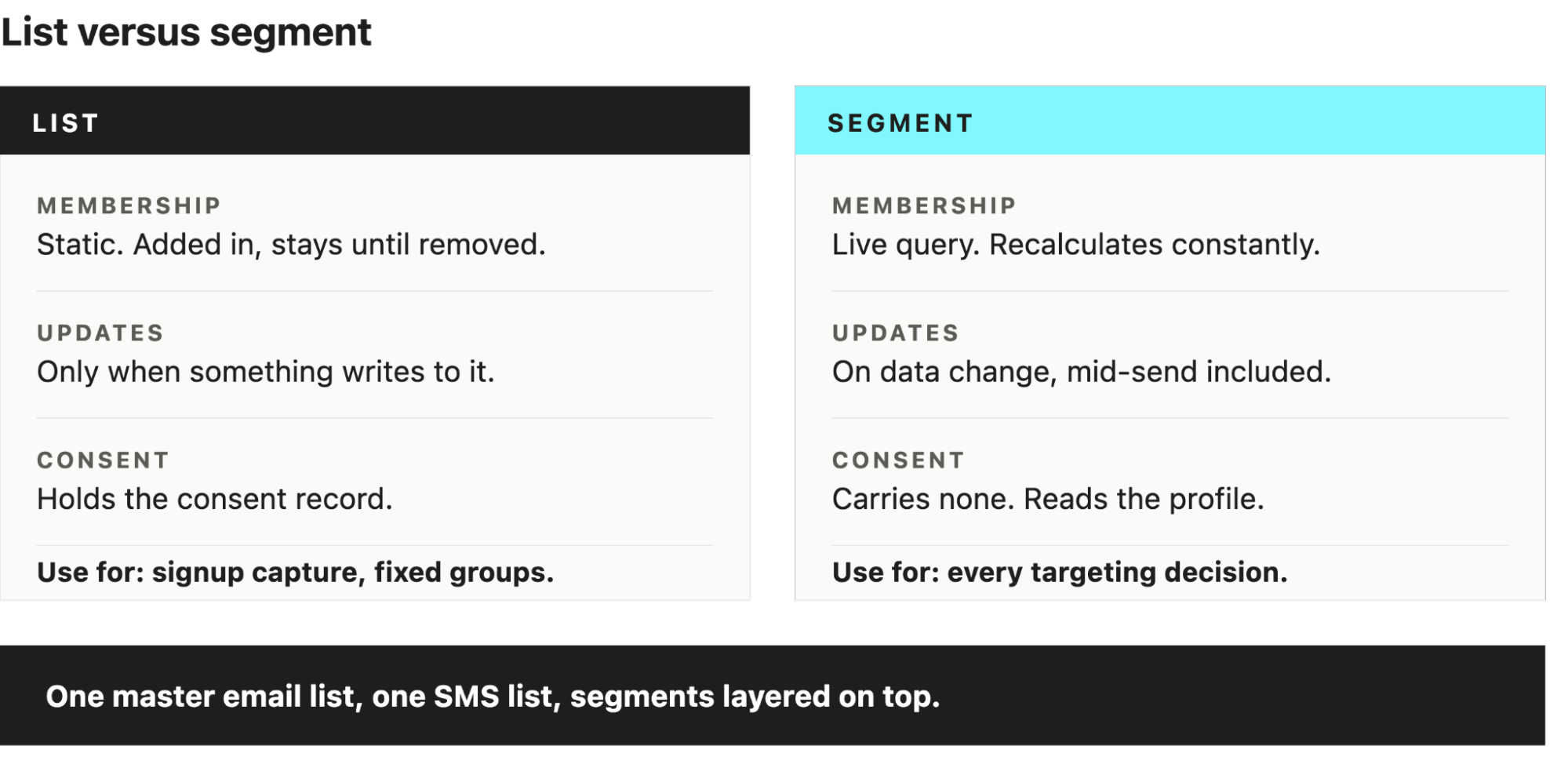
This is how we recommend structuring most DTC accounts, keeping it simple and effective:
- One master email list holding all consented subscribers (Email Subscribers)
- One SMS list (SMS Subscribers)
- Segments layered on top for every targeting decision. (Engaged 30, Product X buyers, Churn Risks)
Building your flow architecture
Flows generate a disproportionate share of owned revenue relative to send volume. In our experience, flows account for around 40% of revenue in an efficient account. The architecture matters more than the copy.
The core flow set
- Welcome. Triggered on list join. Introduces the brand, delivers any signup incentive, and converts the first purchase. Usually the highest revenue-per-recipient flow in the account.
- Browse abandonment. Triggered on Viewed Product without a subsequent add to cart. Lowest intent of the abandonment set, so keep it short and keep discounts out of it.
- Cart abandonment. Triggered on Added to Cart. Requires onsite tracking and a cart cookie.
- Checkout abandonment. Triggered on Started Checkout. Higher intent than cart, and the two overlap heavily, which is a suppression problem covered below.
- Post-purchase. Triggered on Placed Order. Handles order education, cross-sell timed to consumption cycle, and review requests.
- Winback. Triggered on time since last order, calibrated to your actual repeat purchase interval rather than a generic 90 days.
- Back in stock. Triggered on the back in stock event. Requires the Klaviyo inventory listener on product pages.
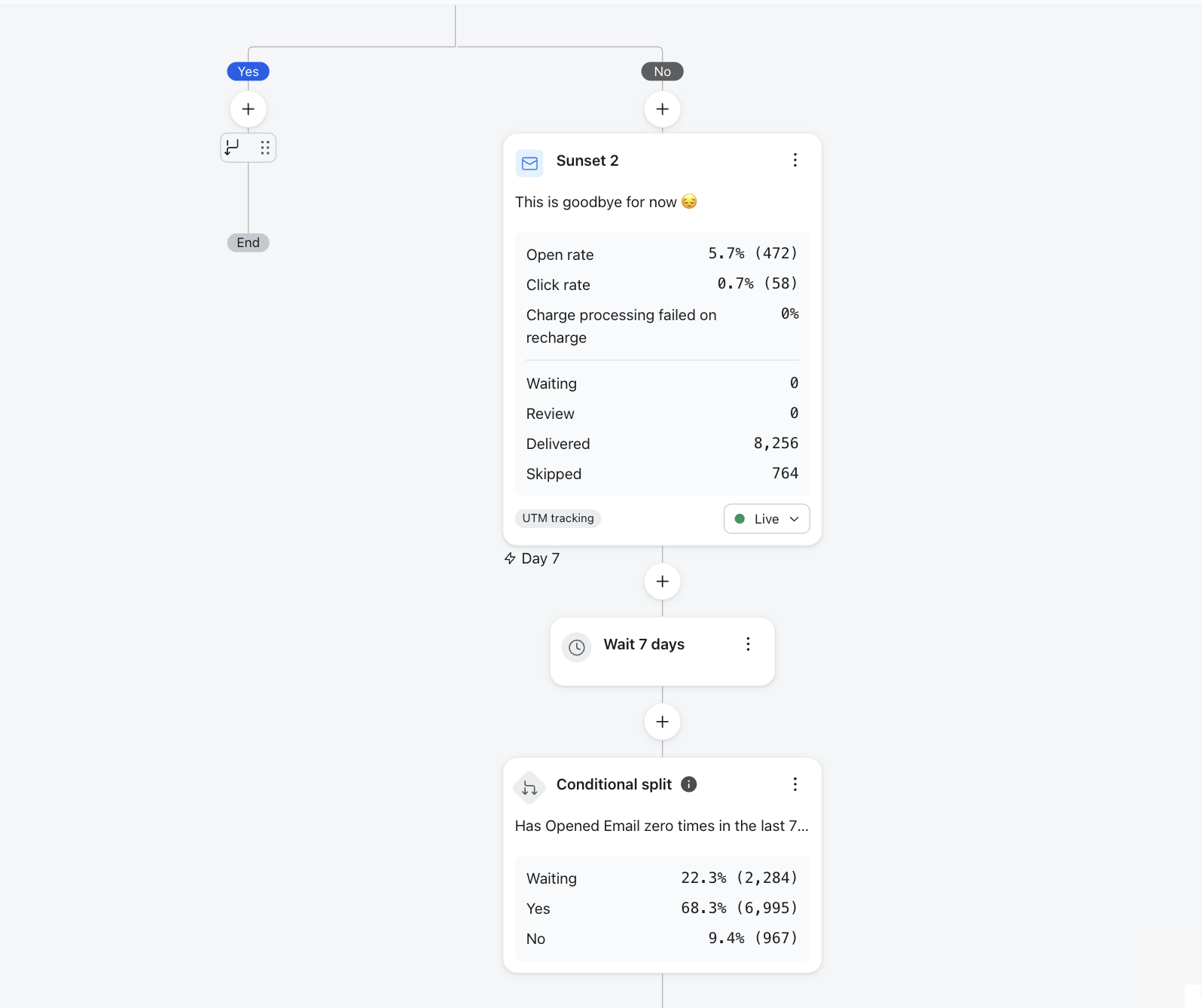
- Sunset. Triggered on sustained non-engagement. Moves unresponsive profiles out of the sending pool before they damage reputation.
Trigger logic, flow filters and conditional splits
Three different controls that get confused constantly:
The trigger decides who enters and when. It evaluates once.
The flow filter evaluates continuously while a profile sits in the flow, and removes anyone who stops qualifying. This is what stops a cart abandonment sequence continuing after the customer purchases.
The conditional split routes profiles down different paths inside the flow without removing them.
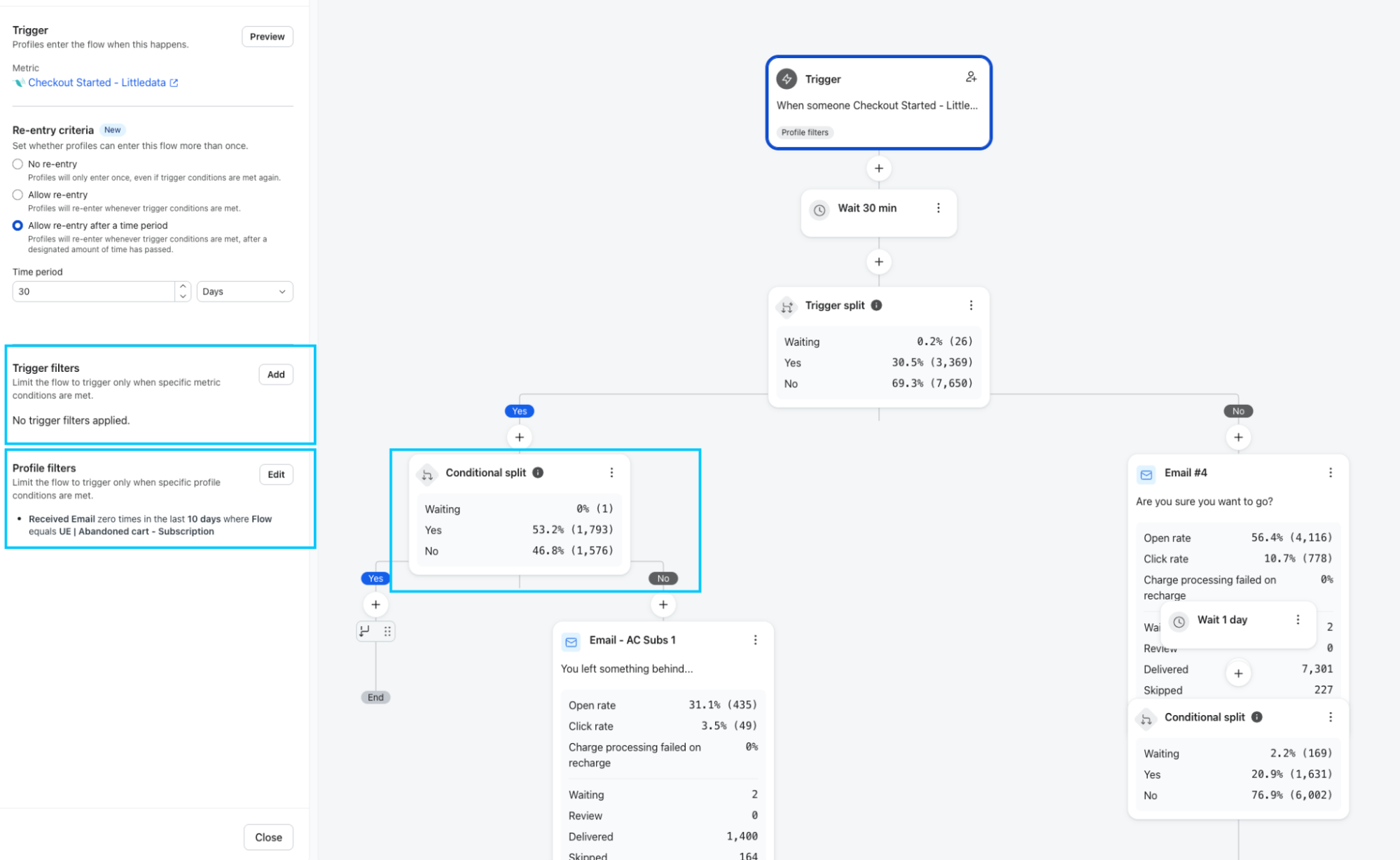
The most common misconfiguration in audits is purchase exclusion set as a trigger filter instead of a flow filter. The customer buys on email one, and emails two and three still arrive. Every abandonment flow needs the exclusion evaluated on an ongoing basis.
Flow overlap and suppression
Another issue we run into all the time while auditing accounts.
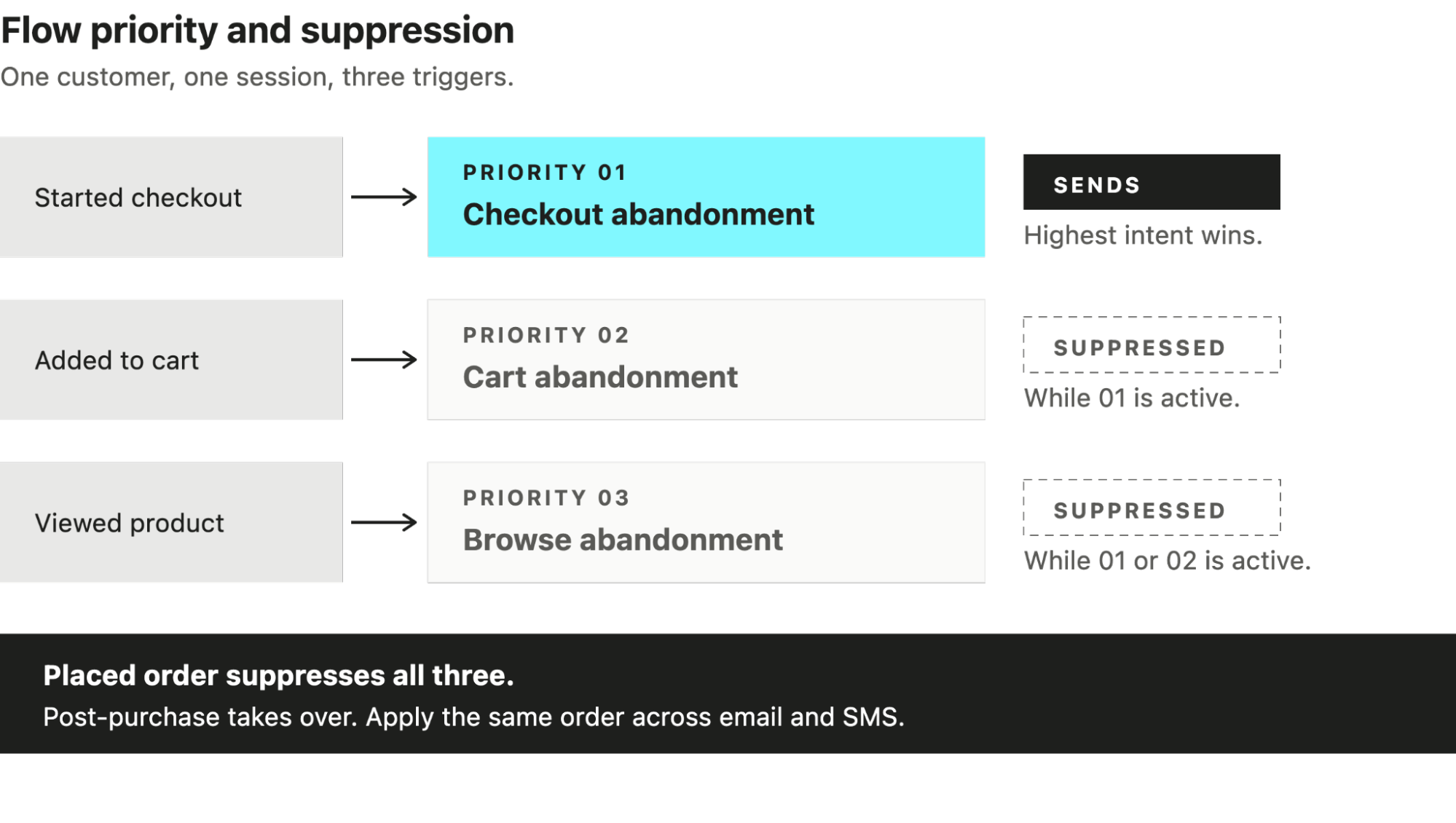
A customer who browses, adds to cart, starts checkout and leaves qualifies for three flows within an hour. Left unmanaged they receive three near-identical emails on the same day.
Klaviyo has no condition for “is currently in another flow.” You suppress by excluding on the higher-priority flow’s trigger metric, set as a flow filter rather than a trigger filter so it keeps evaluating while the profile sits in the sequence.
Set the filters as follows. Every condition uses since starting this flow, not a rolling day window.
- Checkout abandonment: Placed Order zero times.
- Cart abandonment: Started Checkout zero times, Placed Order zero times.
- Browse abandonment: Added to Cart zero times, Started Checkout zero times, Placed Order zero times.
Each flow drops the profile the moment it reaches a higher-intent stage, so the customer only ever receives the most relevant sequence.
The timeframe setting is where this usually breaks. “Zero times in the last 30 days” locks out anyone who bought recently, so a repeat customer abandoning a new cart never enters. “Zero times since starting this flow” scopes the check to the current session, which is what you want.
Post-purchase overrides everything acquisition-side. Apply the same exclusions across SMS, since a customer receiving email one and SMS one of the same sequence within ten minutes reads as one brand messaging them twice.
The hardest version of this problem we have run was Virgin Experience Days: 15 flows, more than 85 emails, multiple triggers and a custom-built site, ahead of BFCM.
That programme ran on Dotdigital and Sendgrid rather than Klaviyo, and the platform imposed a limit Klaviyo does not: we ran out of delay nodes before we ran out of flows. Building one flow per trigger and audience was not available to us.
We merged flows instead. Welcome and post-purchase became a single flow with conditional splits on signup source, purchase behaviour and product type. Every audience received the right sequence, nobody received two, and the transactional sends in Sendgrid stayed visually consistent with the marketing sends in Dotdigital.
The principle transfers to Klaviyo. Fewer, well-split flows beat more flows with exclusion logic bolted on afterwards. Conditional splits inside one flow cannot overlap with themselves. Separate flows can, and will.
Testing before activation
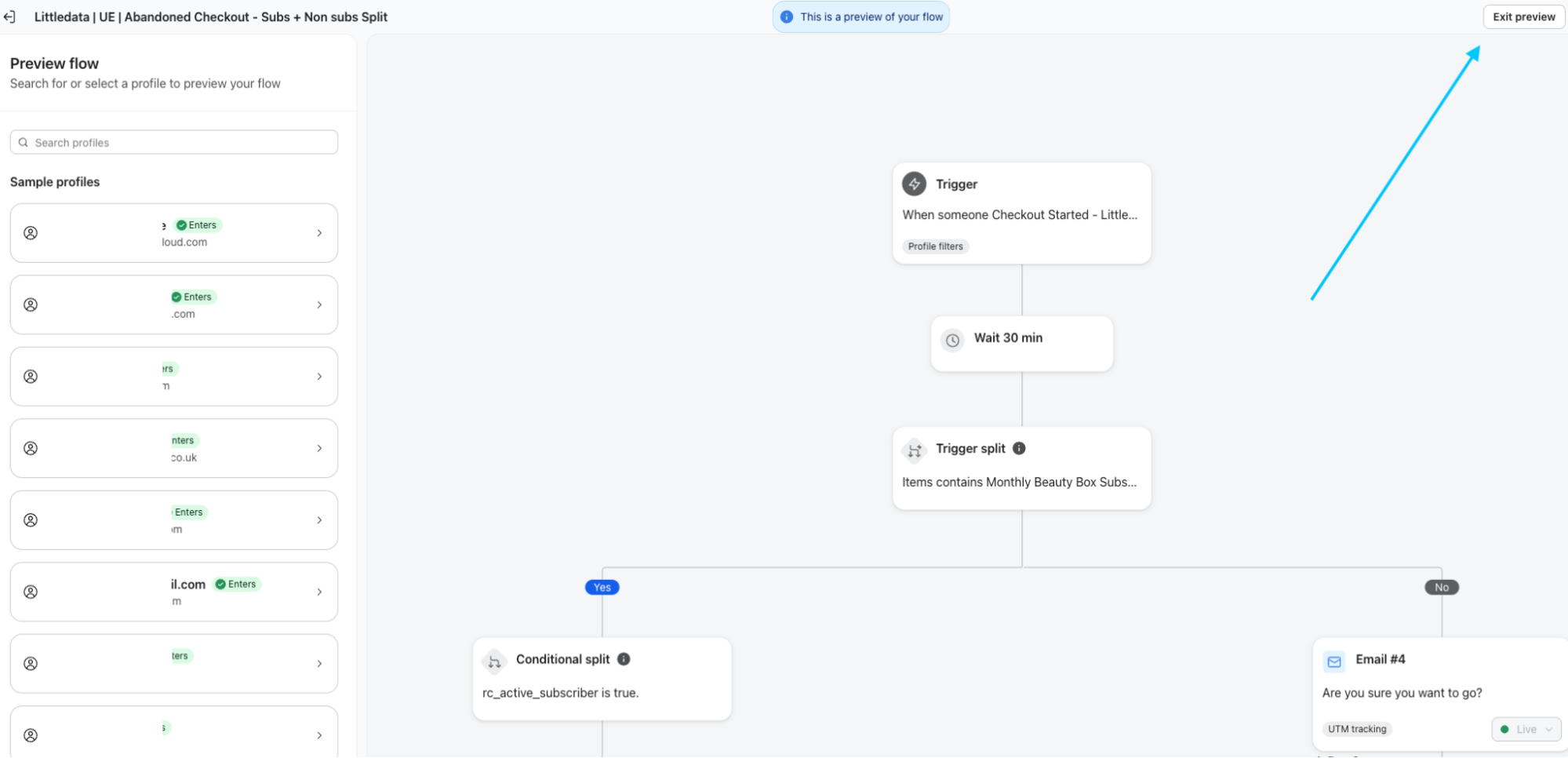
Preview renders do not test logic. Before any flow goes live, push a test profile through every branch, confirm the flow filter removes profiles on purchase, and check that every profile follows the right path. Click on Preview, and then on a specific profile.
Running campaigns in Klaviyo
Campaigns are one-time sends to a chosen audience. Flows are automated and triggered. Both use the same data.
The controls that matter at the campaign level:
- Smart sending sets a minimum gap between messages to the same profile. It prevents a campaign landing on top of a flow email. Leaving it off is a deliberate decision, not a default to ignore.
- Send time optimisation uses per-profile engagement history to pick delivery time. It needs sufficient send history to be worth using.
- A/B testing at campaign level covers subject line, content and send time. Test one variable, and hold the test long enough that the result is not noise.
- Audience exclusions should remove recent purchasers, anyone in an active flow, and any segment the campaign is not intended for.
Segmentation that drives revenue
The segments we build in every account
Every account we onboard gets the same base layer before anything custom goes in. Engaged 30, 60, 90 and 180 days, all built on clicks rather than opens, which gives us the sending pool for campaigns and the thresholds for the sunset flow.
On top of that, fixed in every setup:
- Never engaged. Subscribed, received at least [X] sends, never clicked. This is the sunset candidate pool.
- Recent purchasers. Rolling [X] day window. Used as a campaign exclusion, not a target.
- One-time buyers. Purchased once, past the expected repeat window. The winback audience.
- Repeat buyers. Two or more orders. Segmented further by AOV where the catalogue supports it.
- Discount dependent. Every order carries a code. Kept out of promotional sends and given a full-price path instead.
- Lapsed high value. Above the account’s LTV threshold, no order in [X] days. Smallest segment in the account and usually the highest revenue per recipient.
- SMS consented and engaged. Consent plus a click in the last [X] days, because SMS cost makes broad targeting indefensible.
We stopped building open-based engagement segments in 2022.
We had an account where the engaged 90 day segment looked healthy and the campaigns performed badly against it. Roughly 30% of that segment had opens and no clicks, almost all of it on Apple Mail. Mail Privacy Protection was pre-fetching images, Klaviyo logged an open, and we had been treating those profiles as active for months. We were sending our best campaigns to people who had not looked at an email in half a year, and the reputation damage was showing up in the accounts around it.
We rebuilt every engagement segment on clicks that week and have not used an open condition since.
To know more on engaged segments, we recommend reading this guide.
Deliverability and list health
At UndergroundEcom we love this part, because it is underrated.
A fix here often moves an account from disappointing to strong results faster than anything else.
In short, deliverability determines whether any of the above reaches an inbox. Mailbox providers infer whether recipients want your mail from how they behave: opens, clicks, replies, deletions without opening, spam complaints.
Sending to unengaged profiles depresses those signals across your whole audience, including the people who do want to hear from you.
How to impact deliverability
- Authentication. SPF, DKIM and DMARC on a dedicated sending subdomain. Google and Yahoo enforce authentication requirements on bulk senders, and unauthenticated mail from a high-volume sender gets filtered.
- Sunset policy. Define a non-engagement threshold and suppress past it. The threshold depends on purchase cycle: a brand with a six month replenishment window cannot use the same window as a weekly consumable.
- Re-engagement before suppression. Run a short winback attempt at the threshold rather than suppressing silently. Convert who you can, then suppress the rest without hesitation.
- Complaint rate. Watch it per campaign and per segment. A complaint rate rising on one segment identifies the problem faster than a whole-account average.
- Domain warming. On a new sending domain, start with your most engaged segment and increase volume gradually. Sending your full list on day one of a new domain is the fastest available route to the spam folder.
What a deliverability fix actually looks like
Hydro Flask came back to us after roughly five to six months of near-total inactivity in the account. Minimal sending, and the signals were already deteriorating: elevated unsubscribe rates in flows like Abandoned Checkout, and bounce rates rising across several automations.
Sending to the full list on the restart would have finished the domain. We warmed instead.
For the first 30 days, campaigns went only to small, highly engaged segments. New launches and promotions could not reach the wider list during that window, which is a commercial cost the client had to accept up front. Alongside it we built the Never Engaged suppression segment, added bounce-filter exclusions inside the automated flows, held back 7 day non-openers, and ran plain text tests in the weekly sends to improve primary tab placement.
Then we widened the flow ecosystem. Almost all automated revenue sat in the Welcome flow, so we rebuilt Browse Abandonment with recently viewed alternatives, complementary products and region-based stock messaging, added dynamic paths to Welcome by use case and geography, and introduced non-clicker resends within 48 hours on launches and promotions.
Deliverability score reached 80%. Revenue increased 52%. Automations now drive 78% of revenue.
Reporting: what to measure
Klaviyo reports generously on its own contribution. Read it with that in mind.
Attribution
Klaviyo attributes conversions on a default click and open window. Open-based attribution credits Klaviyo for purchases from customers who never clicked the email, which inflates channel revenue, and Apple pre-fetching makes it worse.
Set the attribution window deliberately. A shorter, click-only window reports lower numbers and reports them more accurately. Agree the window with whoever reads the reporting before you change it, because the change will look like a performance drop.
Metrics worth tracking
- Revenue per recipient as the primary campaign metric. It normalises for audience size, which makes a send to 8,000 engaged profiles comparable to a send to 60,000.
- Click rate over open rate, for the Apple reasons above.
- Flow revenue per profile entered, which tells you whether the sequence converts rather than whether it sends.
- List growth net of suppression. Gross signups without the suppression figure describes nothing.
- Complaint and unsubscribe rate per campaign, tracked as a trend rather than checked when something breaks.
SMS and WhatsApp inside Klaviyo
Klaviyo handles SMS and WhatsApp on the same profile and the same segments as email. Consent and cost work differently.
- Consent is channel-specific and jurisdiction-specific: Email consent does not grant SMS or WhatsApp consent. UK and EU brands operate under GDPR and PECR, which require explicit opt-in per channel and a clear opt-out on every message.
- Cost per message changes targeting economics: Email is effectively free at the margin, so broad sends are defensible. SMS and WhatsApp are priced per message and per country, which makes segment size a direct cost decision. Both go to your highest-intent segments.
- Cross-channel suppression matters more than either channel alone: A customer receiving the same abandonment message by email and SMS within minutes experiences one brand messaging twice. Apply the same exclusions across channels rather than building separate logic for each.
SMS and Osprey
On Osprey, SMS subscribers grew by over 99% across a 12 month period while we rebuilt the retention programme around RFM tiers and loyalty data. Growing the consented base and increasing send volume are different decisions; the first is worth pushing, the second is not.
WhatsApp adds a template approval process, a session window model that differs from SMS, and a Meta quality rating that throttles delivery if you push a cold sender too hard. Availability and pricing vary by market.
How we launched WhatsApp on One Glove
We ran it as a staged build, not a switch-on.
- Consent came before capability: WhatsApp opt-in was layered into the existing on-site pop-up as a second step after email capture, so the ask went to customers who had already committed to one channel. Marketing and transactional consent were separated from day one. No list purchase, no migration, no separate acquisition spend.
- Transactional ran for two months before any marketing message: Order confirmation, shipping, cancellation and refund only. That builds sending history with Meta on the messages customers actually want, which is the fastest route to a stable quality rating, and it means the first WhatsApp a customer receives is useful rather than promotional.
- We positioned it for high-intent moments rather than duplicating the email calendar: Drops, restocks and sale windows. Duplicating the calendar adds cost and fatigue, not revenue.
WhatsApp campaigns average a 30% click rate against roughly 1% on email, with zero spam complaints across the entire programme. Email volume and performance held through the launch.
Klaviyo versus the alternatives
Klaviyo is not the correct choice for every brand. Two comparisons come up repeatedly.
Klaviyo versus Omnisend
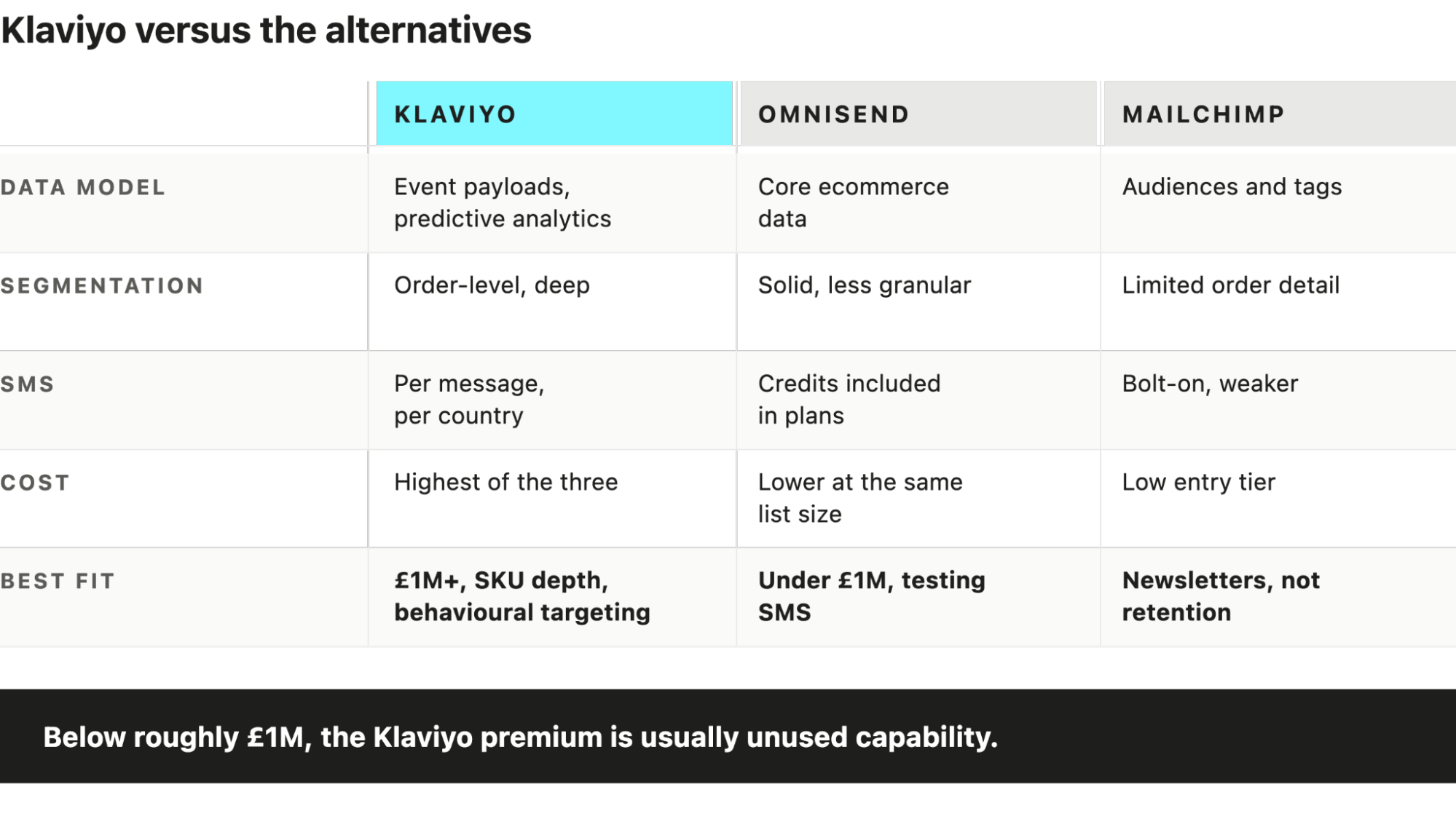
Omnisend covers the same core ground: ecommerce integrations, flows, campaigns, SMS, segmentation. It costs less at equivalent list size and its included SMS credits suit brands testing the channel.
Klaviyo pulls ahead on depth of data. Custom event payloads, predictive analytics, integration breadth beyond the major platforms, and the granularity available in segment builder. That depth is worth paying for once you have enough purchase history and enough SKU complexity to use it.
Below roughly £1M in revenue, the Klaviyo premium is an often unused capability. A brand sending two campaigns a month with four flows is paying for a data platform it operates as an email tool. The honest answer at that stage is that either platform will do the job and Omnisend will cost less doing it.
Klaviyo versus Mailchimp
Mailchimp is a general-purpose email platform with ecommerce features attached. Klaviyo is ecommerce-native.
The practical difference sits in the data model. Mailchimp organises around audiences and tags, with limited access to order-level detail. Building “purchased from collection X, never purchased from collection Y, spent above £Z in the last 12 months” is straightforward in Klaviyo and awkward or impossible in Mailchimp.
Most UK DTC brands past £1M have already migrated. The ones still on Mailchimp are usually running a newsletter rather than a retention programme.
Where Klaviyo stops being the right call
At enterprise scale with complex multi-brand, multi-region or heavy loyalty requirements, platforms like Ometria or Bloomreach handle orchestration Klaviyo is not built for. That is a small minority of DTC brands and a decision driven by operational complexity rather than list size.
Most Common Klaviyo mistakes we see in audits (ranked)
- Purchase exclusion set as a trigger filter rather than a flow filter. Abandonment emails continue arriving after the customer buys.
- No suppression between overlapping abandonment flows. Three flows, one customer, one afternoon.
- No sunset policy. The list grows, engagement rate falls, deliverability follows, and the cause is invisible in campaign-level reporting.
- Engagement segments built on opens. Apple pre-fetching means a meaningful share of the “engaged” segment never opened anything.
- Sending from the shared domain at volume. Reputation outsourced to strangers.
- Segments built and never deleted. Nobody can tell which are live, so nobody deletes any.
- Flows built once and never revisited. A welcome flow written at launch, still running three years and two brand repositions later.
- Klaviyo revenue reported as incremental revenue. Open-window attribution credits the channel for purchases it did not drive.
Frequently asked questions
Is Klaviyo worth it for smaller brands?
Below roughly £1M in revenue the cost premium over Omnisend or similar often buys capability the brand is not using. Klaviyo pays back once you have enough purchase history and SKU complexity to segment on behaviour rather than on list membership.
How much does Klaviyo cost?
Pricing scales with active profile count, with SMS billed separately per message and per country. Suppressed profiles fall outside billing, which makes list hygiene a cost control as well as a deliverability one.
How long does a Klaviyo setup take?
Integrations and domain authentication take days. A full flow architecture, segmentation layer and QA cycle takes weeks. The variable is data readiness, not build time.
Can Klaviyo replace a CDP?
For most single-brand DTC operations it functions as the customer data layer. It stops being sufficient where you need multi-brand identity resolution, offline data reconciliation, or data warehouse orchestration.
Does Klaviyo work outside Shopify?
Yes, with native integrations for WooCommerce, BigCommerce and Magento, plus API access for custom builds. Shopify remains the deepest integration and the one that requires the least engineering to run properly.
What is the difference between a flow and a campaign?
A flow is automated and triggered by profile behaviour. A campaign is a one-time send to a chosen audience. Both query the same profile data.
Want a deeper audit?
We run free Klaviyo audits.
Thirty minutes, operator to operator, no pitch deck. We look at flow architecture, segmentation, deliverability and attribution, and tell you what we would change and in what order.
Jamie Watkins, DIRECTOR AT UNDERGROUNDECOM